For macOS

Control Your Mac
Without a Mouse

Navigate your entire Mac using just your keyboard. Move the cursor, click, scroll, and drag — all without lifting your hands from the keys.

Download Now $6.99 Requires macOS 13.0 or later
W
A
S
D
Space to Click

Press W A S D to try it!

See It In Action

Watch how No Mouse Mode transforms your workflow

Everything You Need

Powerful features that make mouse-free navigation a breeze

Cursor Movement

Use WASD keys to move your cursor in any direction with smooth, precise control.

Click Actions

Space for left click, Return for right click. Hold to drag and drop with ease.

Smooth Scrolling

Arrow keys let you scroll through pages naturally, just like a trackpad.

Speed Boost

Hold Shift while moving for a speed boost. Fully customizable multiplier.

Global Hotkey

Toggle on/off instantly with Cmd+Shift+M from anywhere in your system.

Fully Customizable

Remap any key, adjust speeds, enable acceleration — make it yours.

How It Works

Get started in seconds

1

Download & Install

Download the app and drag it to your Applications folder.

2

Grant Permissions

Allow Accessibility and Input Monitoring in System Settings.

3

Press Cmd+Shift+M

Activate No Mouse Mode and start navigating with your keyboard!

Lives in Your Menu Bar

No Mouse Mode runs quietly in your menu bar. A subtle indicator shows when it's active, and you can access settings with a single click.

  • Minimal resource usage
  • Works on all spaces
  • Native macOS experience
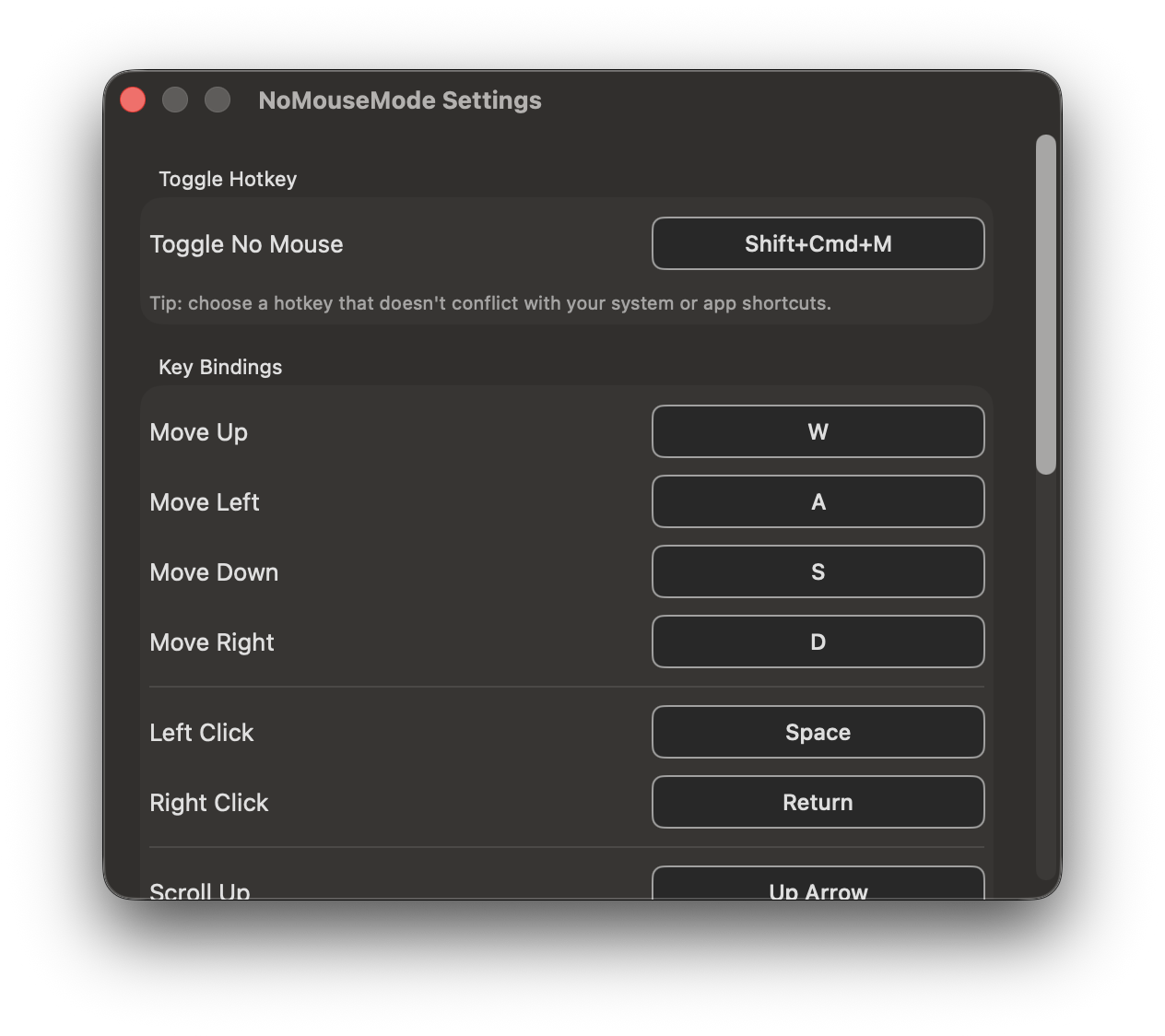
No Mouse Mode settings panel showing customizable key bindings for cursor movement, click actions, scroll speed, and acceleration options on macOS

Fully Customizable

Tailor every aspect of No Mouse Mode to fit your workflow. Remap keys, adjust speeds, and configure the perfect setup for you.

  • Custom key bindings for all actions
  • Adjustable cursor and scroll speeds
  • Speed boost with Shift key
  • Optional acceleration for precision

Frequently Asked Questions

Everything you need to know about No Mouse Mode

How do I control my Mac cursor without a mouse?

With No Mouse Mode, press Cmd+Shift+M to activate keyboard cursor control. Use WASD keys to move the cursor, Space to left-click, Return to right-click, and arrow keys to scroll. It's that simple.

What keys does No Mouse Mode use?

By default: W/A/S/D for cursor movement (up/left/down/right), Space for left-click, Return for right-click, Arrow keys for scrolling, and Shift for speed boost. All keys are fully customizable in settings.

Does it work with macOS Sonoma and Sequoia?

Yes! No Mouse Mode works with macOS 13.0 (Ventura) and all later versions including Sonoma and Sequoia. It runs natively on both Intel and Apple Silicon Macs.

Is this a subscription or one-time purchase?

No Mouse Mode is a one-time purchase of $6.99. No subscriptions, no recurring fees. You own it forever and get free updates included.

Can I customize the keyboard shortcuts?

Absolutely! Every key binding is customizable. You can remap cursor movement, click actions, scrolling, and speed boost to any keys you prefer. Adjust cursor speed, scroll speed, and acceleration too.

What's the difference from macOS Mouse Keys?

No Mouse Mode uses intuitive WASD controls (like gaming), offers smooth scrolling with arrow keys, includes a speed boost feature, and provides full customization — features not available in the built-in macOS Mouse Keys.

No Mouse Mode app icon - macOS keyboard cursor control utility

No Mouse Mode

One-time purchase. Yours forever.

$ 6 .99
Download for macOS

Requires macOS 13.0 (Ventura) or later